Not always, but many smart home devices are designed to “listen” in some form while they’re powered on. The important distinction is whether a device is constantly recording and sending audio to the cloud, or simply monitoring for a short “wake word” (like “Alexa,” “Hey Google,” or “Siri”) using on-device processing.
Most voice-assistant speakers and displays keep their microphones active so they can detect the wake word. In typical operation, they don’t continuously upload everything you say. Instead, they buffer small snippets of sound locally and only start transmitting audio after the wake word is detected. However, accidental activations happen—TV dialogue, conversations, or similar-sounding words can trigger a recording and send it for processing.
Many devices use a low-power chip that’s dedicated to wake-word detection. When the wake word is detected, the device begins recording a command and sends it to the service to interpret. Some newer models can process more requests locally, but cloud processing is still common for better accuracy and features.
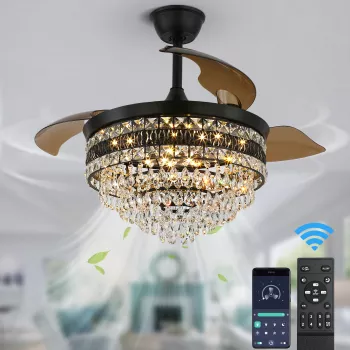
Plenty of smart home gear isn’t listening at all because it has no mic—think smart bulbs, smart plugs, and many smart fans controlled by a remote, wall control, or app. Even among “smart” appliances, connectivity doesn’t automatically mean audio monitoring.
If you’re shopping for connected home upgrades like a smart ceiling fan, it helps to separate voice control (which may involve a third-party assistant and its microphones) from the product itself. For a practical example of smart features that don’t necessarily require a built-in mic, see this related guide: https://splendona.com/guide-42-inch-smart-ceiling-fan-led-pendant-6-speed-remote-guide/.
Use the hardware mic-mute switch when available, review your voice history in the companion app, disable “use recordings to improve services” settings, and place voice assistants away from TVs. If a device offers local control (remote/app) without voice, that can also minimize audio exposure.
Check the product specs for “microphone,” “voice control,” or “built-in assistant,” and look for a physical mic-mute button or a pinhole mic opening on the housing. If the device pairs with Alexa/Google via a separate speaker, the microphone is typically on the speaker, not the device itself.
Not always, but many smart home devices are designed to “listen” in some form while they’re powered on. The important distinction is whether a device is constantly recording and sending audio to the cloud, or simply monitoring for a short “wake word” (like “Alexa,” “Hey Google,” or “Siri”) using on-device processing.
Most voice-assistant speakers and displays keep their microphones active so they can detect the wake word. In typical operation, they don’t continuously upload everything you say. Instead, they buffer small snippets of sound locally and only start transmitting audio after the wake word is detected. However, accidental activations happen—TV dialogue, conversations, or similar-sounding words can trigger a recording and send it for processing.
Many devices use a low-power chip that’s dedicated to wake-word detection. When the wake word is detected, the device begins recording a command and sends it to the service to interpret. Some newer models can process more requests locally, but cloud processing is still common for better accuracy and features.
Plenty of smart home gear isn’t listening at all because it has no mic—think smart bulbs, smart plugs, and many smart fans controlled by a remote, wall control, or app. Even among “smart” appliances, connectivity doesn’t automatically mean audio monitoring.
If you’re shopping for connected home upgrades like a smart ceiling fan, it helps to separate voice control (which may involve a third-party assistant and its microphones) from the product itself. For a practical example of smart features that don’t necessarily require a built-in mic, see this related guide: https://splendona.com/guide-42-inch-smart-ceiling-fan-led-pendant-6-speed-remote-guide/.
Use the hardware mic-mute switch when available, review your voice history in the companion app, disable “use recordings to improve services” settings, and place voice assistants away from TVs. If a device offers local control (remote/app) without voice, that can also minimize audio exposure.
Check the product specs for “microphone,” “voice control,” or “built-in assistant,” and look for a physical mic-mute button or a pinhole mic opening on the housing. If the device pairs with Alexa/Google via a separate speaker, the microphone is typically on the speaker, not the device itself.
Not always, but many smart home devices are designed to “listen” in some form while they’re powered on. The important distinction is whether a device is constantly recording and sending audio to the cloud, or simply monitoring for a short “wake word” (like “Alexa,” “Hey Google,” or “Siri”) using on-device processing.
Most voice-assistant speakers and displays keep their microphones active so they can detect the wake word. In typical operation, they don’t continuously upload everything you say. Instead, they buffer small snippets of sound locally and only start transmitting audio after the wake word is detected. However, accidental activations happen—TV dialogue, conversations, or similar-sounding words can trigger a recording and send it for processing.
Many devices use a low-power chip that’s dedicated to wake-word detection. When the wake word is detected, the device begins recording a command and sends it to the service to interpret. Some newer models can process more requests locally, but cloud processing is still common for better accuracy and features.
Plenty of smart home gear isn’t listening at all because it has no mic—think smart bulbs, smart plugs, and many smart fans controlled by a remote, wall control, or app. Even among “smart” appliances, connectivity doesn’t automatically mean audio monitoring.
If you’re shopping for connected home upgrades like a smart ceiling fan, it helps to separate voice control (which may involve a third-party assistant and its microphones) from the product itself. For a practical example of smart features that don’t necessarily require a built-in mic, see this related guide: https://splendona.com/guide-42-inch-smart-ceiling-fan-led-pendant-6-speed-remote-guide/.
Use the hardware mic-mute switch when available, review your voice history in the companion app, disable “use recordings to improve services” settings, and place voice assistants away from TVs. If a device offers local control (remote/app) without voice, that can also minimize audio exposure.
Check the product specs for “microphone,” “voice control,” or “built-in assistant,” and look for a physical mic-mute button or a pinhole mic opening on the housing. If the device pairs with Alexa/Google via a separate speaker, the microphone is typically on the speaker, not the device itself.






Leave a comment