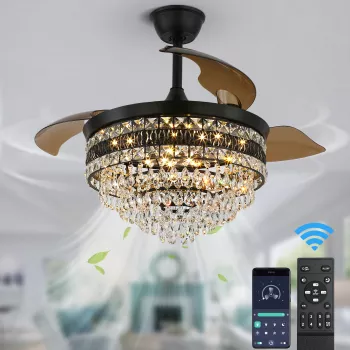
A smart home connects everyday devices—like lights, thermostats, locks, speakers, and ceiling fans—to a shared network so they can be controlled remotely and automated. Instead of flipping a switch or turning a dial, you send commands through an app, a voice assistant, or pre-set routines. Behind the scenes, those devices communicate using Wi‑Fi, Bluetooth, Zigbee, Z‑Wave, or a newer standard called Matter (which helps different brands work together more smoothly).
Most smart homes rely on four pieces working together: the devices, a controller, a network, and automations. The “controller” might be a phone app, a smart speaker display, or a dedicated hub that translates signals between device types. Your home internet (plus a stable Wi‑Fi router) provides the connection for cloud features and remote access, while local wireless protocols keep many devices responsive even when they’re far from the router.
When you tap “Turn on living room fan” in an app, your phone sends a command to the device either through the cloud (over the internet) or locally (over your home network), depending on how the system is set up. The device’s built-in controller receives the command, switches power or adjusts a motor, and often reports its new status back to the app. That feedback loop is what lets you see whether something is on, off, locked, or set to a specific speed.
Automations link triggers to actions. A trigger could be time of day, motion, temperature, or a door opening. The action could be dimming lights, adjusting a thermostat, or changing a fan speed. For example, a ceiling fan can run faster when the room warms up, then slow down at night—improving comfort without constant manual tweaks.
Smart ceiling fans add connected control to something you use daily: airflow and lighting. Many models support scheduling, multiple speeds, and remote/app control, which makes them a practical entry point for home automation. For a deeper look at features like 6-speed control and integrated LED lighting, see this smart ceiling fan guide.
Some devices with voice assistants keep a low-power microphone active to detect a wake word, then record and process audio after activation. Devices without voice control (like many lights, plugs, and sensors) typically don’t use microphones at all.
Common concerns include privacy, ongoing app subscriptions, confusing setups, and products that stop getting updates over time. Others dislike relying on internet connectivity for basic functions or dealing with too many separate apps.






Leave a comment