
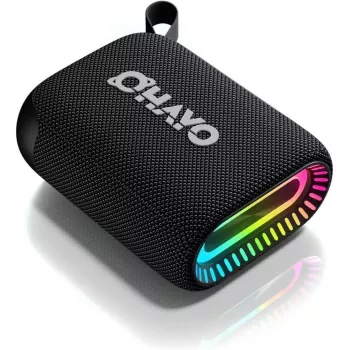
Connecting an IPX7 waterproof Bluetooth speaker is usually a quick pairing process, whether you’re using an iPhone, Android phone, tablet, or laptop. IPX7 simply refers to the speaker’s water-resistance rating, so the connection steps are the same as most Bluetooth speakers.
Charge the speaker until it has enough battery to pair reliably, then press and hold the power button to turn it on. If your model has a dedicated Bluetooth button, press it to enter pairing mode.
Most IPX7 speakers enter pairing mode automatically the first time they’re turned on. If it doesn’t, look for a blinking Bluetooth indicator light or an audible pairing prompt. If it’s already connected to another device nearby, disconnect or “forget” it on that device first.
On your phone or tablet, open Bluetooth settings and enable Bluetooth. Keep your device within a few feet of the speaker for the initial connection.
Find the speaker name in the “Available Devices” list (often the brand/model name) and tap it to pair. If prompted for a PIN, try 0000 or 1234 (many modern speakers won’t require a code).
Once paired, play music or a video and raise the volume on both the device and the speaker. If audio still comes from your phone, tap the audio output selector on your device and choose the Bluetooth speaker.
If the speaker won’t connect, restart both devices, move away from crowded Wi-Fi/Bluetooth areas, and remove the speaker from your device’s Bluetooth list (“Forget This Device”), then pair again. If it’s still stuck, reset the speaker (common methods include holding Power + Bluetooth or Power + Volume Down for several seconds, but check your manual).
For more model-specific tips and setup details, visit the full guide here: https://splendona.com/guide-hook-waterproof-bluetooth-speaker-ipx7-24-hour-playtime/.
Look for a reset button or press-and-hold a common combo such as Power + Bluetooth for 5–10 seconds until you hear a tone or see the lights flash. After resetting, remove the speaker from your phone’s Bluetooth list and pair again.



Leave a comment